Arrays in JavaScript
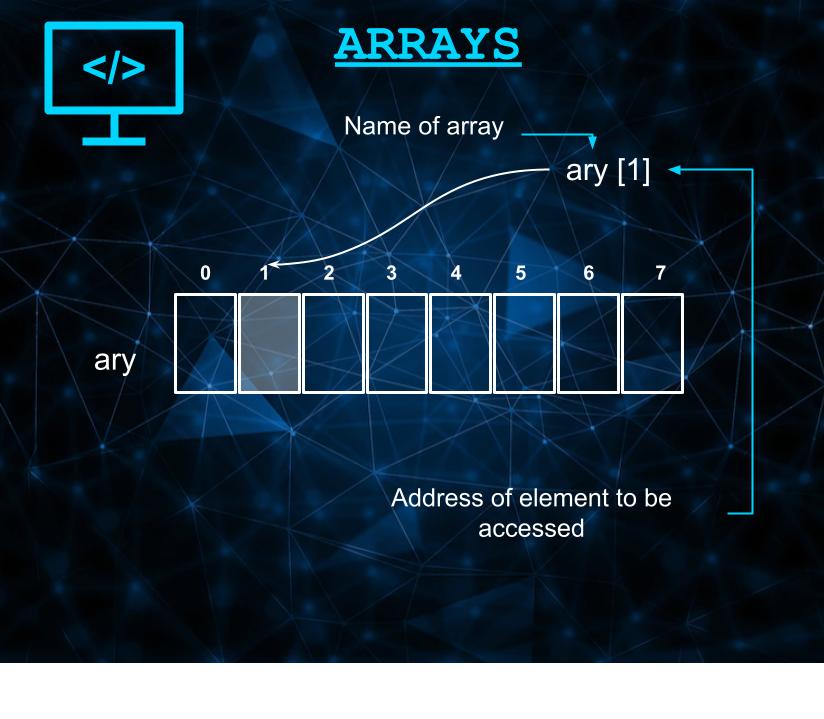
Arrays if not the important are by far the most pertinent concept that one needs to be aware and definitely master in order to have a solid command over any language.
What is an Array?
An array is defined as the collection of different items either of same or different data types stored at contiguous memory locations.
Why an array?
I am no no judge myself to pass a verdict as to why was array introduced but why not? I mean take a scenario for instance. You are advised to create a telephone recode for 10 persons. Each recode will contain a name, telephone number, address, Pin-Code.
Now if you go on the usual route of declaring variables for each and every thing, you'll end up with more than 50 variables to be accounted for.
let phone1=10;
let name1="Sandra";
let phone_number1=8076XXXXXX;
let pinCode=560029
.
.
.
However, for an array it's all simple. Declare an array, store all this inside an array and create 10 of them. That's almost half the job solved already.
let directory1=[10,"Sandra",8076XXXXXXX,560029];
See, everything has a reason.
Also if you want to manipulate an array, you are free to do that as well. You can edit an entry, cut out a portion, whatever comes on top of your mind. If you're coming from a programming background, you're already aware of how tough these operations are and the lines of codes that you need to write in. In other languages such as C, C++ for instance, writing a single sorting code, i.e., to sort the elements inside an array you have to write down the entire following code.
int a =[160,80,10,20,40,90];

for (int i=0;i<6;++i) {
  if (a[i] > a[i+1])
    {  int j=a[i];
        a[i]=a[i+1];
        a[i+1]=j;
    }
}
This will sort the array.
a=[10,20,40,80,90,160]
But you see the amount of code that you had to write. It's not to undermine other languages. However in languages like JavaScript, all you need to type is...
let a =[160,80,10,20,40,90];
a.sort();
a=[10,20,40,80,90,160]
And that's all it takes. Two lines of code.
Let's dive into other such cool functionalities provided in JavaScript.
Length of Array
Definition: It allows you to print length of an array
Syntax
array_name.length
let arr=[1,2,3,4,5,6];
console.log(arr.length);

//Output :
6
Slicing an Array
Definition: It allows you to slice an existing array into another array.
Changes the original array: NO
It takes in two parameters:
- Starting index - Index or address from where the array is to be sliced.
- End index - [Index-1] or [address-1] till where the array is to be sliced.
Syntax
array_name.slice(startindex,endindex);
let arr=[1,2,3,4,5,6];
console.log(arr.slice(1,3));

//Output : [2,3]
Splicing an Array
Definition: It allows you to modify the existing array
Changes the original array: YES
It takes in two parameters:
- Index - Position from where to start the modification in the array.
- How may to delete - The entered number is the number of elements deleted starting from the index.
- Item 1, item 2 - optional Indicates the value to be appended by the user.
Syntax
array_name.splice(index,how many to delete, item 1, item 2);
let arr=[1,2,3,4,5,6];
let arr1=[1,2,3,4,5,6];
arr.splice(1,0,10,20);
arr1.splice(1,1,10,20);
console.log(arr);
console.log(arr1);

//Output :
[
  1, 10, 20, 2,
  3,  4,  5, 6
]
[
  1, 10, 20, 3,
  4,  5,  6
]
Copy within an array
Definition: It allows you to create a copy within an array
Changes the original array: YES
It takes in Three parameters:
- Index - Position at which the copied section will be replaced.
- starting index - Index from where the copy will start.
- ending index - index till where the copy is to be done.
Syntax
array_name.copyWithin(index,starting index for copy, ending index till copy);
let arr=[1,2,3,4,5,6];
arr.copyWithin(1,3,5);
console.log(arr);

//Output :
[ 1, 4, 5, 4, 5, 6 ]
Remove elements from the beginning
Definition: It allows you to remove elements one by one from the beginning of the array.
Changes the original array: YES
Syntax
array_name.shift();
let arr=[1,2,3,4,5,6];
arr.shift();
console.log(arr);

//Output :
[ 2,3,4,5,6 ]
Remove elements from the last
Definition: It allows you to remove elements one by one from the end of the array.
Changes the original array: YES
Syntax
array_name.pop();
let arr=[1,2,3,4,5,6];
arr.pop();
console.log(arr);

//Output :
[ 1,2,3,4,5 ]
Add elements at the beginning
Definition: It allows you to add elements one by one from the beginning.
Changes the original array: YES
Syntax
array_name.unshift(element);
let arr=[1,2,3,4,5,6];
arr.unshift(10);
console.log(arr);

//Output :
[ 10,1,2,3,4,5,6 ]
Add elements at the end
Definition: It allows you to add elements one by one at the end
Changes the original array: YES
Syntax
array_name.push(element);
let arr=[1,2,3,4,5,6];
arr.push(10);
console.log(arr);

//Output :
[ 1,2,3,4,5,6,10 ]
Reverse the elements
Definition: It allows you to reverse the elements order
Changes the original array: YES
Syntax
array_name.reverse();
let arr=[1,2,3,4,5,6];
arr.reverse();
console.log(arr);

//Output :
[ 6,5,4,3,2,1 ]
Array as String
Definition: It allows you to print entire array as string.
Changes the original array: NO
Syntax
array_name.toString();
let arr=[1,2,3,4,5,6];
console.log(arr.toString());

//Output :
1,2,3,4,5,6